|
|||
      |



 |
|
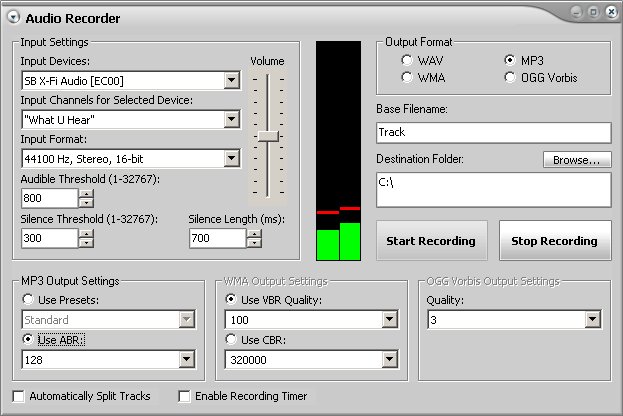
OGG Recorder Software - Record OGG FilesThe Blaze Media Pro software features a powerful OGG recorder feature that can record from any source available on your system, such as line-in for cassette or LP recording, "Wave" or "What You Hear" for recording streaming audio/media, etc. The OGG recorder feature can save audio directly to OGG, MP3, WMA (using any desired profile), WAV (using any compression codec), and more. The OGG recorder also includes a recording timer which enables you to schedule the software to record from the selected source at a predefined time and stop after a desired duration. Recorded OGG audio can also be edited after the recording process is complete, without saving first. You only need to save once after all desired alterations are complete. To use the software's OGG recording capabilities, click "Audio Recorder " from the "More Audio Options" link on the main interface or select the "Audio Recorder " option from the main window's File menu. From the resulting window, you can select the source from which you want to record, control the recording volume, and click the Start Recording button when you're ready to begin. When recording is complete, press the Stop Recording button to complete the audio save operation. Blaze Media Pro's OGG recorder feature is very fast and easy to use. Advanced options are available for those who want to take advantage of them, though they are completely optional, making Blaze Media Pro the perfect OGG recorder software for users of any experience level. Click here for more information on Blaze Media Pro and the software's OGG recording feature or download your copy now.
OGG Recorder Software Related Topics: Audio Recorder, MP3 Recorder, WMA Recorder, WAV Recorder, Music Recorder, Sound Recorder
|
|







 |

